
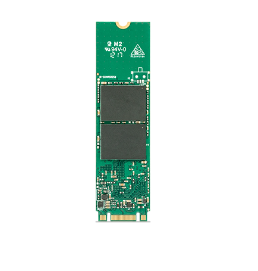
Industrial M.2 SATA SSD
Compact & Reliable SATA Storage for Industrial and Embedded Systems
Key Features
- Compact M.2 Form Factor
- Proven SATA Compatibility
- Long Lifecycle Supply
- Industrial Reliability
- Wide Temperature Options
- Advanced Data Protection
- OEM Customization
Product Overview
Industrial M.2 SATA SSD for Reliable Embedded Storage
Indudisk Industrial M.2 SATA SSDs are designed for industrial and embedded systems that require dependable storage, proven SATA compatibility, and long-term product availability.
Using the compact M.2 form factor and SATA III interface, these SSDs provide an efficient storage solution for industrial PCs, embedded computers, transportation equipment, medical devices, surveillance systems, and automation platforms.
With industrial-grade NAND Flash, advanced firmware, data protection features, and optional wide-temperature operation, Indudisk M.2 SATA SSDs are built for reliable 24/7 operation in demanding industrial environments.
Why Choose an Industrial M.2 SATA SSD?
Compatibility and lifecycle can be more important than maximum speed.
Proven SATA Compatibility
The SATA interface is widely supported across industrial PCs, embedded computers, and legacy platforms
Compact M.2 Form Factor
The compact design saves space while providing reliable solid-state storage.
Industrial Reliability
Designed for stable operation in demanding industrial environments.
Long Lifecycle
Long-term product availability helps reduce redesign and qualification costs.
Wide Temperature Options
Selected models support wide temperature ranges for harsh environments.
OEM Customization
Firmware, NAND configuration, endurance, and other features can be customized for specific projects.
Industrial M.2 SATA SSD vs M.2 NVMe SSD
| Feature | Industrial M.2 SATA SSD | Industrial M.2 NVMe SSD | |
| Interface | SATA III | PCIe | |
| Protocol | SATA/AHCI | NVMe | |
| Performance | Moderate | High | |
| Latency | Higher | Lower | |
| Compatibility | SATA-compatible systems | NVMe-compatible systems | |
| Power | Generally lower | Higher performance-oriented | |
| Best For | Embedded & legacy systems | AI, edge computing, high-speed applications |
M.2 refers to the physical form factor, while SATA and NVMe refer to different storage interfaces and protocols. An M.2 slot does not automatically support both SATA and NVMe. Always verify host-system compatibility before selecting an SSD.
M.2 SATA vs 2.5" SATA vs mSATA
| Feature | M.2 SATA SSD | 2.5″ SATA SSD | |
| Form Factor | M.2 | 2.5-inch | |
| Interface | SATA III | SATA III | |
| Size | Compact | Larger | |
| Installation | M.2 slot | SATA cable / bay | |
| Best For | Compact embedded systems | IPC & larger industrial systems | |
| Space Requirement | Low | Higher |
Industrial M.2 SATA SSD Applications
🏭 Industrial Automation
Reliable storage for industrial PCs, HMIs, controllers, machine systems, and factory automation equipment.
🖥 Industrial PCs
Compact SATA storage for IPCs and embedded computers requiring proven platform compatibility.
🚆 Transportation & Rail
Reliable storage for onboard computers, railway systems, and intelligent transportation equipment.
📹 Surveillance
Reliable storage for monitoring, video recording, and security systems.
🛡 Rugged & Embedded Systems
Compact industrial storage for rugged computers and embedded platforms deployed in demanding environments.
Technical Specifications
Industrial M.2 SATA SSD Specifications
| Physical | |||||||
| Form Factor | M.2 2280 | ||||||
| Interface | SATAIII | ||||||
| Size | 80x22x3.7 mm | ||||||
| Capcity | 256GB ~4TB | ||||||
| Flash Type | 3D TLC | ||||||
| Performance | |||||||
| Sequential Read/Write | 550/520 MB/S | ||||||
| Random IOPS Read/Write(4K) | 90K/80K IOPS | ||||||
| Access Time | <0.1ms | ||||||
| Electrical | |||||||
| Power Supply | 3.3V±5%(Max 1.95A) | ||||||
| Power Consumption | Active: ≤3.8W Idle: ≤1.6W | ||||||
| Temperature | |||||||
| Operating Temperature | (0℃~+70℃)/(-20℃~+70℃)/(-40℃~+85℃) | ||||||
| Storage Temperature | (-55℃~+95℃) | ||||||
| Environmental | |||||||
| Vibration | 6.06Grms(Peak,20-2000Hz,x3 Axis,10minutes/Axis) | ||||||
| Shock(Operating) | 50G(11ms,Half sine wave) | ||||||
| Humidity | 5%~95%(No Condensing) | ||||||
| Reliability | |||||||
| MTBF | 2000000h | ||||||
| Data Retention(Max): | 10 Years@25℃ | ||||||
| Special Functions | |||||||
| Power Loss Protection(PLP) | Optional | ||||||
| Secure Erase | Optional | ||||||
| TRIM | Optional | ||||||
| S.M.A.R.T | Optional | ||||||
| AES256 Encryption | Optional | ||||||
FAQ
Before SSD technology emerges, HDD is the main storage device . HDD is a traditional hard drive consists of a spinning disk with a read/write head on a mechanical arm called an Hard Disk. An HDD reads and writes data magnetically. The magnetic properties, however, can lead to mechanical breakdowns.
While SSD is a non-volatile storage media that stores constant data on solid-state Nand Flash chips. Now SSDs are replacing traditional HDD in computers as storage device. Because SSDs are much faster in comparision .With an SSD, the device 's OS will boot up more quickly ,Programs will load quicker and files can be saved faster.
Generally speaking, SSDs Solid State Drives are better than HDD for most users due to its faster speed,improved durability and quieter operation.However,HDDs offer higher storage capacity at a lower cost ,which makes it a better option for large data storage.
Before SSD technology emerges, HDD is the main storage device . HDD is a traditional hard drive consists of a spinning disk with a read/write head on a mechanical arm called an Hard Disk. An HDD reads and writes data magnetically. The magnetic properties, however, can lead to mechanical breakdowns.
While SSD is a non-volatile storage media that stores constant data on solid-state Nand Flash chips. Now SSDs are replacing traditional HDD in computers as storage device. Because SSDs are much faster in comparision .With an SSD, the device 's OS will boot up more quickly ,Programs will load quicker and files can be saved faster.
Generally speaking, SSDs Solid State Drives are better than HDD for most users due to its faster speed,improved durability and quieter operation.However,HDDs offer higher storage capacity at a lower cost ,which makes it a better option for large data storage.
As an SSD buyer, it is very key to choose the right SSD product at favorable price for your project. But do you know how to choose a right SSD solution for your projects ? As an SSD expert, the starting point is to learn about your application. For example, what is your operating temperature ?Is it used as a system drive or mass capacity data transfer ? Is it mainly used for read or write operations ? What OS ? Since all answers above related to your application is very pivotal to select a right SSD that aligns perfectly with your requirements and uphold unwavering quality.
Industrial SSDs: mainly designed specifically for system designers and builders and capable of operating in extreme environments.Industrial SSDs come in a wide variety of small form factors with different interfaces.We normally require reliable performance and consistency for industrial storage solutions.
Nomrally industrial ssds are designed for high reliability and performance operating in extreme environments while consumer SSDs are cost-effective storage for everyday us.The eKey differences include operating temperature ranges, durability, write endurance, and features like power loss protection and error correction.
Industrial SSDs are crafted for resilience in extreme environments, making them ideal for various demanding applications. They boast greater endurance and reliability than consumer SSDs, thanks to their rugged design and rugged components. Industrial SSDs have significantly higher reliability and endurance, with program/erase (P/E) cycles of around 3000 to100,000 compared to only about 1,000 for consumer SSDs. This allows industrial SSDs to handle heavy workloads for much longer before wearing out. Furthermore, they are designed to endure industrial temperatue and wide temperature ranges (from -40°C to 85°C, while consumer SSDs typically only support 0°C to 70°C).
The main difference between industrial ssd and military ssd lies in the design for environmental resilience,security features and reliability.Industrial SSDs are built to withstand harsh conditions like extreme temperatures and vibrations, while military SSDs incorporate even more rigorous standards for security, data protection, and resistance to environmental stressors like shock, vibration,humidity and electromagnetic interference.
Most people are still confused to select a right SSD type . Generally speaking, this greatly depends on the operating temperature range of your application environment for the SSD. As an SSD manufacturer ,Consumer SSDs/Commercial SSDs are designed to operate at temperatures ranging from 0 degrees Celsius to 70 degrees Celsius , Industrial SSDs are designed to operate at temperatures ranging from -20 degrees Celsius to 70 degrees Celsius while military SSDs/rugged SSDs are designed to operate at temperatures ranging from -40 degrees Celsius to 85 degrees Celsius.
Generally Speaking, we can differ Industrial SSDs from military SSDs by their Operating Temperature as below:
- Commercial SSD Operating Temperature: 0C to +70C
- Industrial SSD Operating Temperature :-20C to +70C
- Military SSD Operating Temperature:-40C to +85C
If you are exploring your options for industrial flash storage, two contenders are likely to be on your list: SLC NAND and MLC NAND. Both forms of NAND flash storage are popular and reliable, and each one has its most appropriate uses. The trick is not using MLC NAND when you really need SLC, or paying for SLC when you could get by with MLC. Which NAND flash storage technology is right for your application? This comparison of SLC NAND vs. MLC NAND will help you make up your mind.
With SLC NAND, one bit of data is stored on each cell. This kind of storage is extremely important for devices in which critical data will be saved.It provides suitable reliability and greatly minimizes the risk of data loss and corruption.
With MLC Nand,MLC stands for multi-level cell with two bits of data are stored per cell.You will find it most often in commercial and industrial applications. MLC NAND is the right solution for these products because it costs less than SLC NAND.
SLC and MLC flash mermory are similar in their design. MLC SSDs cost less and allow for higher storage density. SLC SSDs provide faster write performance and higher reliability.
With TLC Nand, a triple-level cell NAND flash, stores three bits of data per cell.It is ideal for consumer grade products because the price point of TLC flash is the lowest of these three forms.
As for SSD endurance, SLC SSD is rated at approximately 100,000 PE cycles per cell. SLC SSD is is rated at approximately 10,000 PE cycles per cell. TLC SSD is rated at approximately 3,000 PE cycles per cell.While QLC is rated at approximately only 1,000 PE cycles per cell.
An SSD form factor is the size, configuration or physical arrangement of solid-state storage media.The form factor determines the media's physical compatibility and interchangeability with other computer components or devices.
2.5"
when buying an SSD, the first thing you want to know is which form factor fits your system. SSDs come in a variety of form factors. For example,2.5" is the most common type of SSD and fits into most laptop or desktop computers.It has a similar shape to a traditional HDD and connects over SATA cables so it offers a very familiar experience to what many are already used to.
M.2
M.2 has become the standard type of storage for slim laptops and notebooks.Its tiny form factor is often compared to a stick of gum and easy to install right on the motherboard in most cases. It is available in various lengths to enable different SSD capacities, The longer the drive,the more Nand flash chips can be mounted on it leading to higher capacity SSDs.
mSATA
mSATA or mini-SATA,is essentially a smaller version of the full-size SATA SSD,It uses a compact form factor like M.2 but not interchangeable.M.2 SSD can support both SATA and PCIe interface options whereas mSATA only supports SATA. This form factor is designed for smaller form factor systems where space is limited.
U.2
Finally,there's U.2 which looks like a 2.5" drive but it is a bit thicker .It uses a different connector and sends data through the PCIe interface.U.2 SSD is typically used for high-end workstations,servers and interprise applications that need greater storage.It allows higher operating temperatures and is more favorable for transferring heat than M.2 form factor.
While M.2 and NVMe are popularly used now,they actually refer to different technologies that can be used together but:
- NVMe is a storage transfer protocol specially designed for high-performance,non-volatile storage media.
- M.2 is an SSD form factor that enables high-performance storage.
- M.2 SSD connected using the NVMe interface deliver faster read/write speed
M.2 SATA SSDs use the SATA interface with a max. data transfer of 6Gbps. This is slow compared to the new NVMe intefaces. But it have 3 to 4 times the bandwidth compared to traditional HDD and is more available and affordable than a NVMe SSD. So it is a great alternative
M.2 NVMe SSDs are much more performance driven compared to M.2 SATA SSDs. By leveraging the PCIe bus, M.2 NVMe SSDs have theoretical transfer speeds of up to 20Gbps which is already faster compared to M.2 SATA SSDs with 6Gbps. PCIe buses can support 1x, 4x, 8x, and 16x lanes.
Consumer 2.5" SATA SSDs are primarily designed for PCs and everyday workloads, while Industrial 2.5" SATA SSDs are optimized for continuous operation, wider temperature ranges, higher endurance, long-term availability, and industrial system integration.
Yes. The standardized 2.5" form factor and SATA interface make Industrial 2.5" SATA SSDs highly compatible with many industrial PCs and embedded systems.
SSD lifespan depends on NAND type, capacity, workload, write volume, and operating conditions. For industrial applications, endurance should be evaluated using workload-specific metrics such as TBW, DWPD, and expected service life.
Need a Reliable Industrial M.2 SATA SSD?
Tell us your capacity, operating temperature, workload, endurance, interface, and expected product lifecycle. Our SSD specialists can recommend the right storage solution for your application.